Every day we work with clients: we write proposals, answer their emails and prepare presentations.
A few days ago a client sent us this question:
“Before we open a Viva account for payments, remind me why you want us to go this way, and what the advantages and disadvantages are compared with Piraeus Bank, where we are now.”
If I open a new chat in Claude and type “Reply to this client email”, together with the question, this is the answer I get:
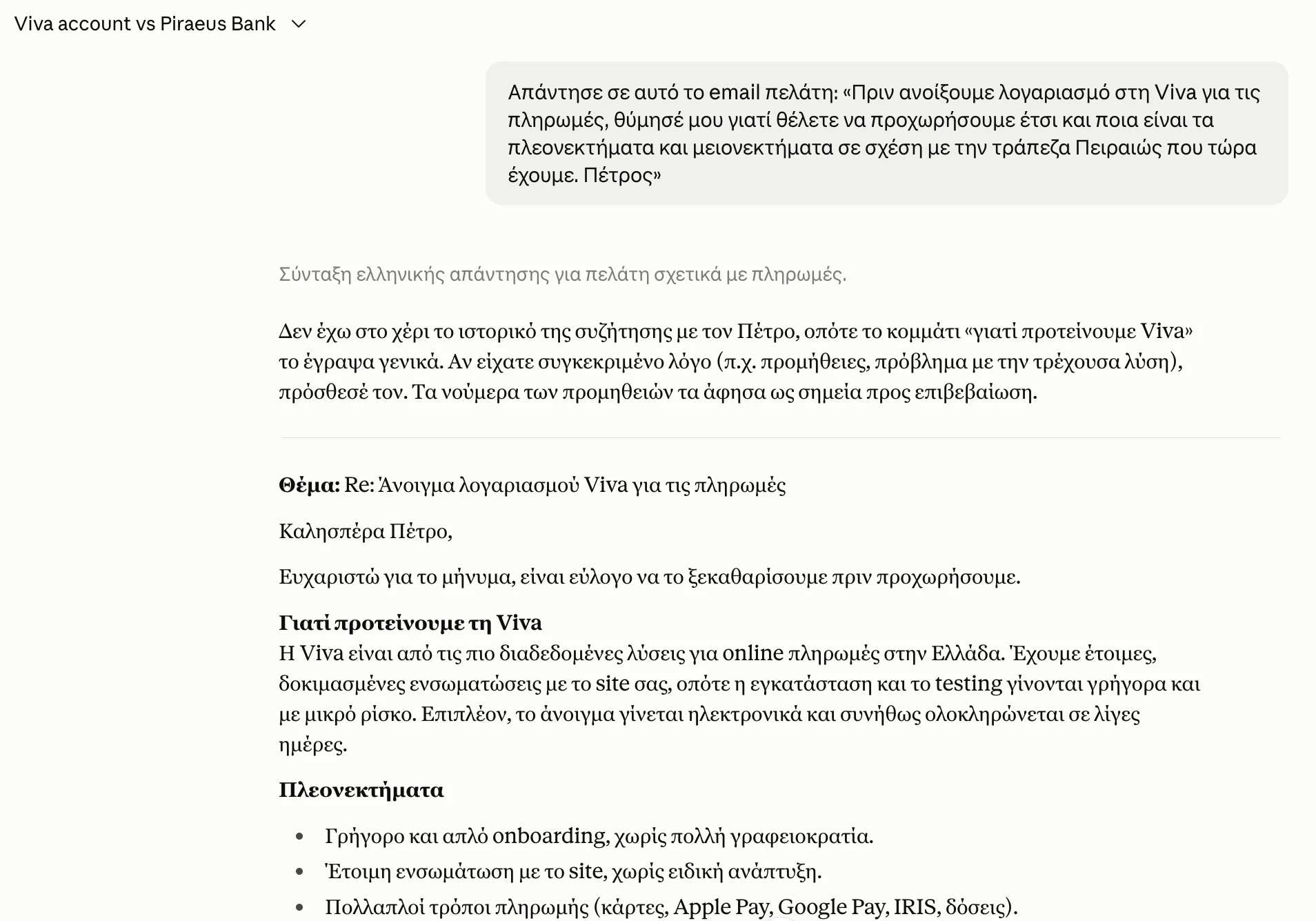
Claude's answer when all I give it is the client's email. The chat is in Greek, the language I write to my clients in.
A polite email, with advantages that any company could write to any client.
Claude says so itself, before the email: it doesn't have the history of the conversation with the client, so it wrote the reason we recommend Viva in general terms.
And how would it know?
It doesn't know who the client is, what we have said so far or which solution we have proposed. It doesn't even know how I write my emails. I gave it only this, and it gave me the answer it would give anyone.
What you type to Claude is called a prompt. The less you tell it about your work, the more generic its answer. You see the same if you ask it for a proposal or a presentation.
I prepare all of this with Claude in my 2 companies. At WEDOHYPE we build websites and landing pages, and at Liberators AI we set up AI systems for businesses.
A proposal after a client call used to take me 30 minutes. Now it takes 3. Most jobs of this kind (a presentation, an email, a document) take me under 5 minutes.
It comes down to 2 moves that you can make for your own business:
- You have Claude ask you questions first, before it writes anything.
- You give it context: what it needs to know about the company, the client and the job before it starts.
Let's look first at how a proposal comes out in 3 minutes, because that's where you see both moves together.
How I make a proposal after a client call
For a proposal, Claude collects what it needs by itself through connectors. A connector is a link between Claude and a tool you already use, so Claude can read from it directly.
I have connected quite a few tools to my Claude, and 2 of them matter for a proposal. The first is Fireflies, which records my calls and writes them out as text. After every call I have the transcript: everything that was said, word for word.
The second is a connector we built for the Gmail, Calendar and Drive of WEDOHYPE (developers call this an MCP). Through it Claude reads my emails with each client.
When I ask for a proposal, before it writes anything, Claude asks me: “Which client is the proposal for?”
As soon as I tell it, it pulls the transcript from Fireflies and the emails from Gmail by itself, and I don't paste anything.
It also reads the company files: our services, past proposals and our rules for how we write.
It shows me what it will write in each section and asks for 1 confirmation. Then it writes the proposal, and I read it before it goes to the client.
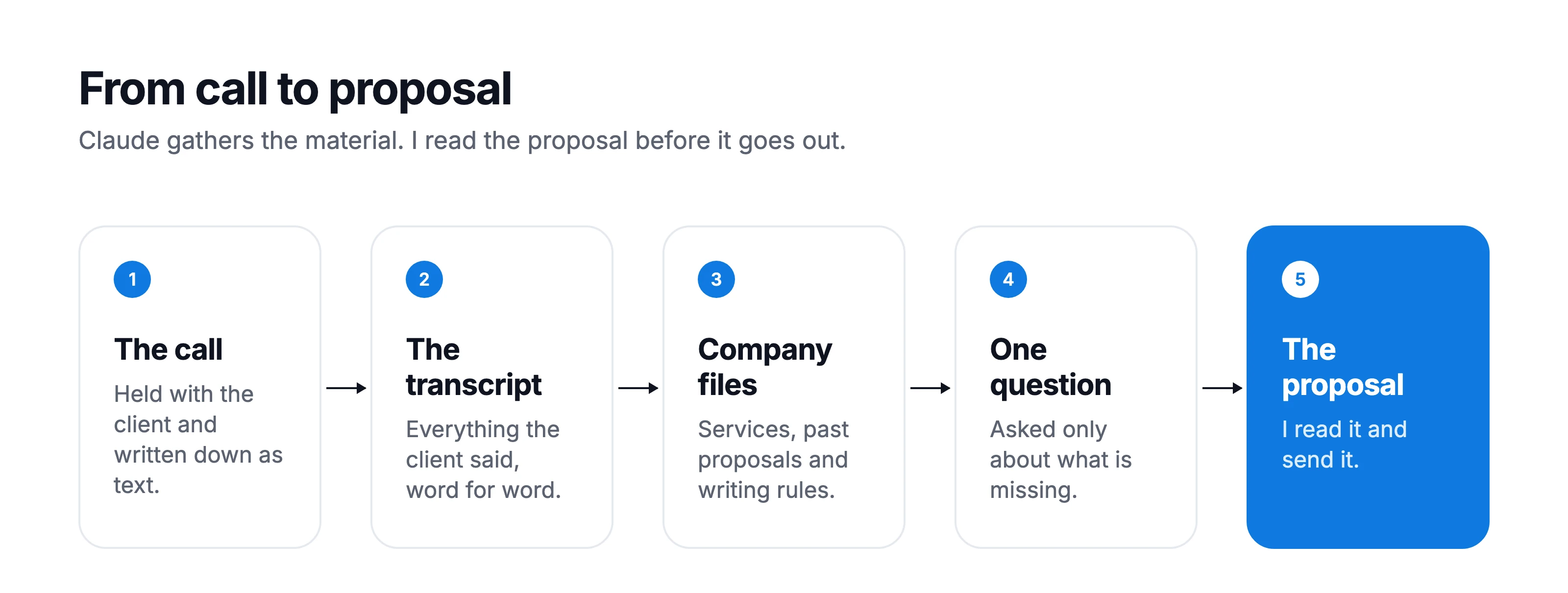
The 5 steps from the client call to the proposal I send.
These are the 2 moves in practice: it asks me first, and before it writes it reads what it needs about the client and about us.
How to connect Fireflies and Gmail to Claude
Fireflies and Gmail have ready-made connectors in Claude, built by the companies themselves, so you don't need to build your own like we did.
- In the left menu, click “Customize” and then the “Connectors” tab.
- Click “Discover” and type “Fireflies” or “Gmail” in “Search”.
- Click the “+” to the right of the connector, sign in with your account and give Claude permission.
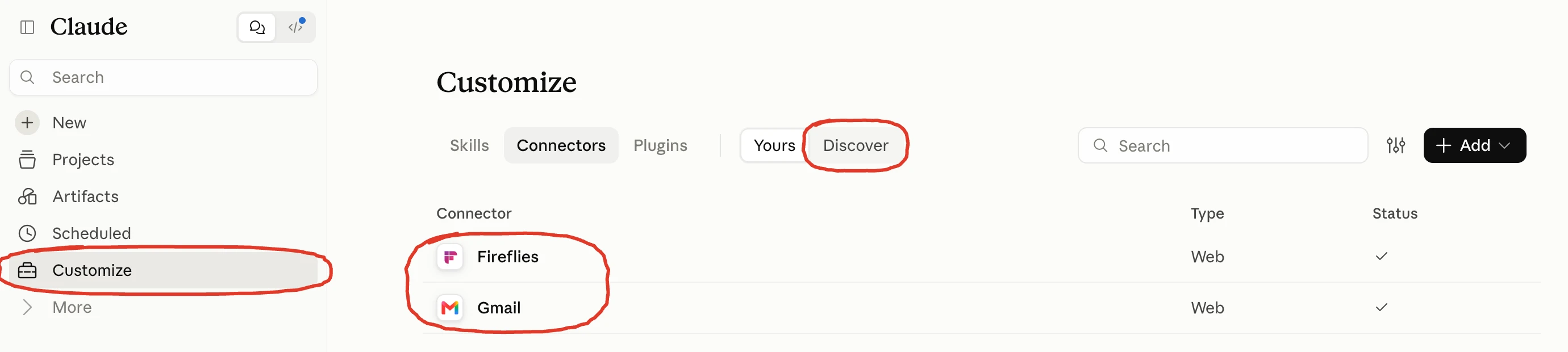
Under “Customize”, on the “Connectors” tab, everything you have connected shows under “Yours”, like Fireflies and Gmail here.
You can try the first move in your very next chat, even without connectors.
How to have Claude ask you questions first
At the end of your message, write “Before you start, ask me whatever you need.” Claude sends you its questions first, you answer, and then it writes using what you told it.
How it asks me before replying to a client
Let's go back to the client from the opening of this article. This time I reply from inside a Project in Claude, which is a space for a specific job, with instructions and files that apply to every chat inside it.
Mine is for WEDOHYPE sales and it's called “WEDOHYPE Sales Pipeline”.
I ask Claude to prepare the reply. It finds the thread in Gmail by itself, which is the whole conversation with the client, and before it writes, it sends me its questions:
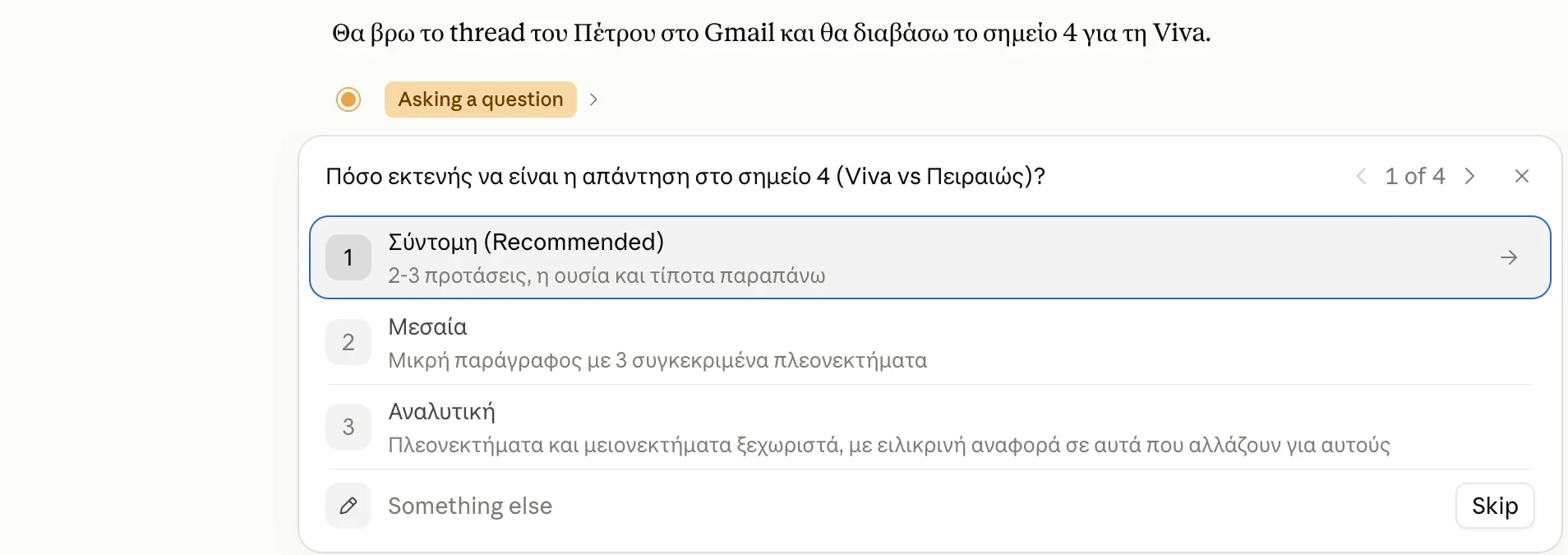
The first of Claude's 4 questions.
Because I asked for options, every question comes with ready-made answers, and I pick with 1 click. If none fits, I write my own under “Something else”.
How it asks me before making a presentation
For presentations I don't even need to ask, because Claude already has the instruction to ask me first.
My system is set up like this, with the whole company in folders that Claude reads:
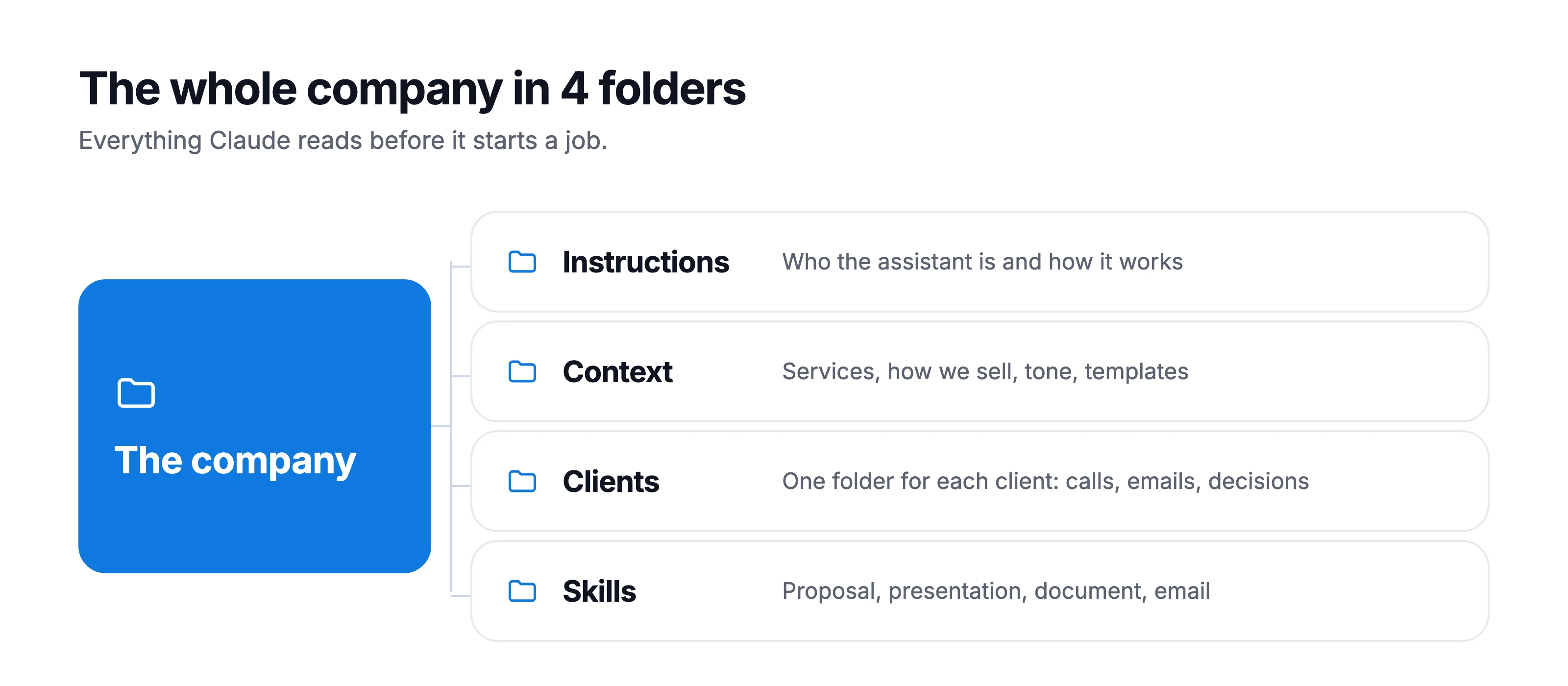
The company in 4 folders, with Claude's instructions in the first one.
When I ask for a presentation, it sends me all its questions in 1 message, split into groups: the basics (title, audience, length, language), the brand, the images, the structure, and the close, meaning what I want the audience to do afterwards.
At the end it asks, “Do you have notes or a transcript to send me?”
As soon as I answer, it writes in 5 lines what it understood, proposes the slide titles and waits for my OK. Only then does it build the deck, always with the same design and the same brand.
What it asks before writing copy for a website
At Liberators AI, when Claude writes copy for a website, it first asks what tone we want: corporate or sales.
Then it asks about whichever of these 8 things we haven't already told it:
- what the business does, in 1 sentence
- what kind of page it is (landing page, home, “about us”, e-shop)
- what kind of business it is (service, product, restaurant, event)
- what the goal of the page is (leads, sales, bookings, sign-ups)
- which language
- which audience
- what sets it apart from competitors
- which tone or reference site you like
When you ask for copy for your own business's website, put these 8 questions in your message and ask Claude to ask you the ones you haven't answered yet.
How many questions it needs
The more Claude knows, the fewer questions it asks.
For the proposal it asks 1 question and requests 1 confirmation, because it finds the transcript and the company files by itself.
For the reply to the client from the opening it asked 4, with ready-made options, because I asked it to ask me whatever it can't find in the conversation.
For a presentation from scratch it knows much less, so it asks a lot, all together in 1 message, so you answer once.
I answer its questions by talking.
Why I answer Claude with my voice
When you speak, you say more than you would write. You remember what the client said, you add a detail you wouldn't have bothered to type, and all of it becomes context for Claude.
To talk to Claude I use Swift Type, a dictation app for Mac: you speak, and it types what you say into whichever app you have open.
It's our own software, built at Liberators AI by my team. Many clients and users have it, and I use it every day.
3 things matter for working with Claude:
- it works in every app, so you speak straight into Claude's field
- it removes the “um”s and adds punctuation
- it handles Greek and English in the same sentence, the way we all talk at work
The most important part is what you tell Claude.
What context Claude needs
Anthropic, the company that makes Claude, describes it in its prompting guidelines as a very capable new employee who doesn't yet know how you work.
To that employee you would explain how the company works, who the client is and what you have already discussed with them. Claude needs the same.
Context comes in 2 kinds, and each goes in a different place.
What holds for every job: you write it once and put it in the context of a Project. That means how you work and sell, your rules for how you write, your templates, for example the structure of a proposal.
The material for each job, like the transcript of a call or the thread with the client: you give it in the chat, or Claude pulls it by itself, if you have connected your tools with connectors.
⚠ Careful: before you give Claude client emails or transcripts, open Settings → Privacy and check the setting “Help improve our AI models”. When it's on, Anthropic may use your chats to train its models. If you don't want that, turn it off.
How I reply to client emails
To Claude's questions about the client I answered: “Short and in my style, and close by suggesting a short call if they want to go through it together.”
Claude had already read the whole thread from Gmail, and it wrote this:
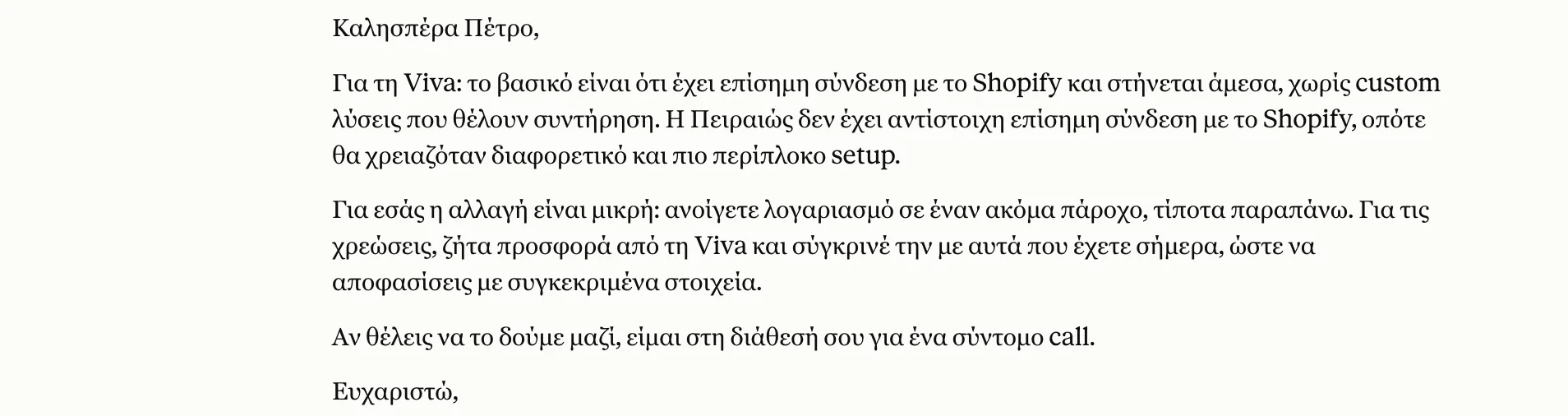
The reply to the client, written inside the WEDOHYPE sales Project.
This time Claude knows from the thread that we have recommended Shopify to the client, and it answers on that basis: Viva connects officially with Shopify.
This is how I reply to WEDOHYPE clients' emails. Claude knows how I write, because it sees emails I have sent, and it keeps the whole thread with the client. It writes the draft, I read it and I send it.
How I make Liberators AI documents for clients
At Liberators AI, Claude also makes the documents we send to clients. For documents I have a skill, which is a set of instructions written once for 1 kind of job, and Claude follows it for every document.
The skill locks down how each document looks: A4 pages that become a PDF, with the same design and the same tone, and 1 section on each page.
And every time Claude works in the same order:
- it gathers the material: the client's folder, the full transcripts of the calls, the emails and our services
- it writes the list of pages first, with the title of each, so I can see the structure
- it writes the content
- it produces the PDF and checks it page by page before it goes out
This is how the document for AI Awakening looks, for example, the training programme Liberators AI runs for company teams:
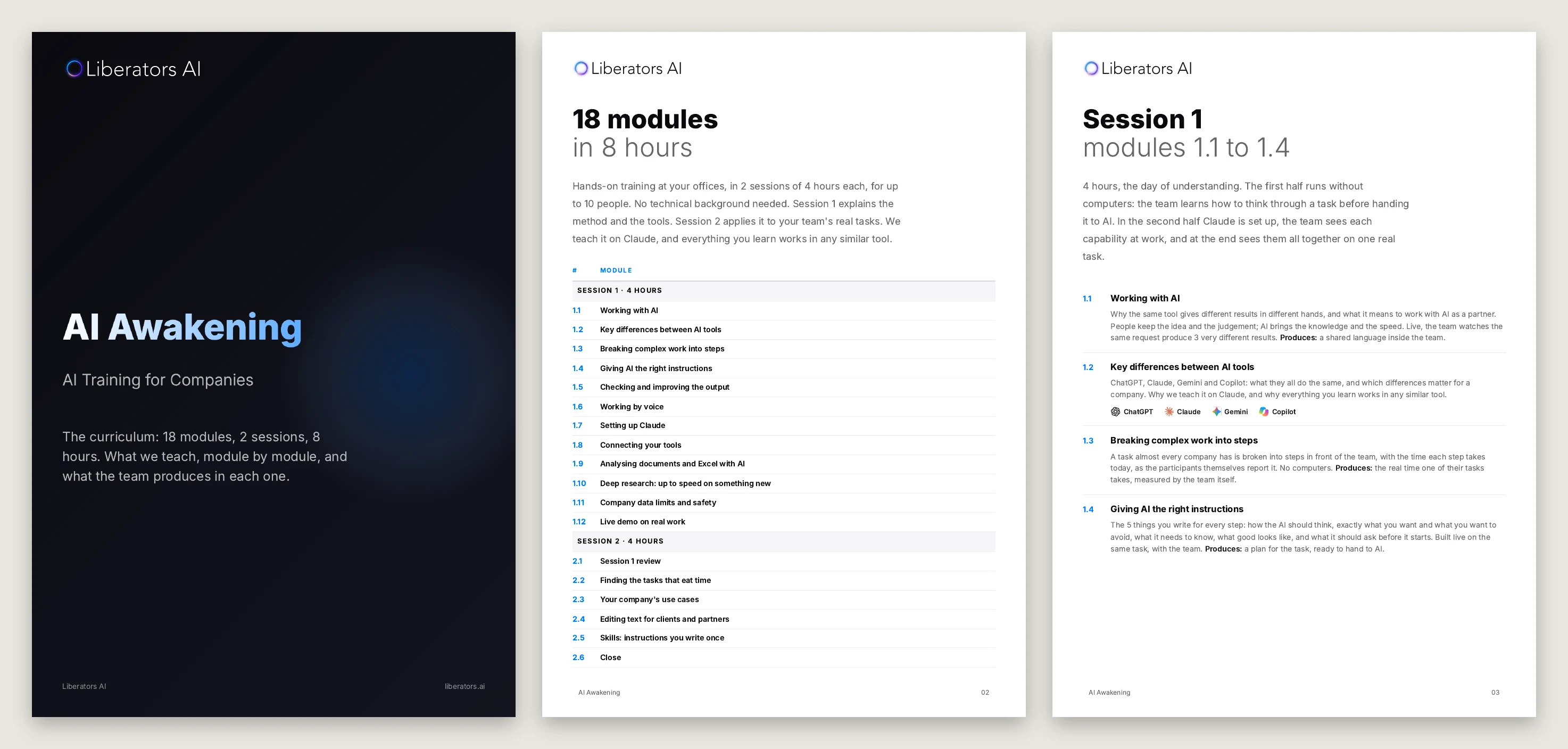
The cover and 2 pages from the AI Awakening document, with the same design on every page.
If you put the context and the questions in the same message, in the right order, you have a complete prompt.
How to write a complete prompt for Claude
Write “Make me a proposal for the client” and Claude guesses everything else.
A message with structure tells it, in order, what it needs to know, and at the end asks it to question you about whatever is missing.
I teach this structure under the name RICEQ, from the initials of the 5 parts: Role, Instructions, Context, Example, Questions.
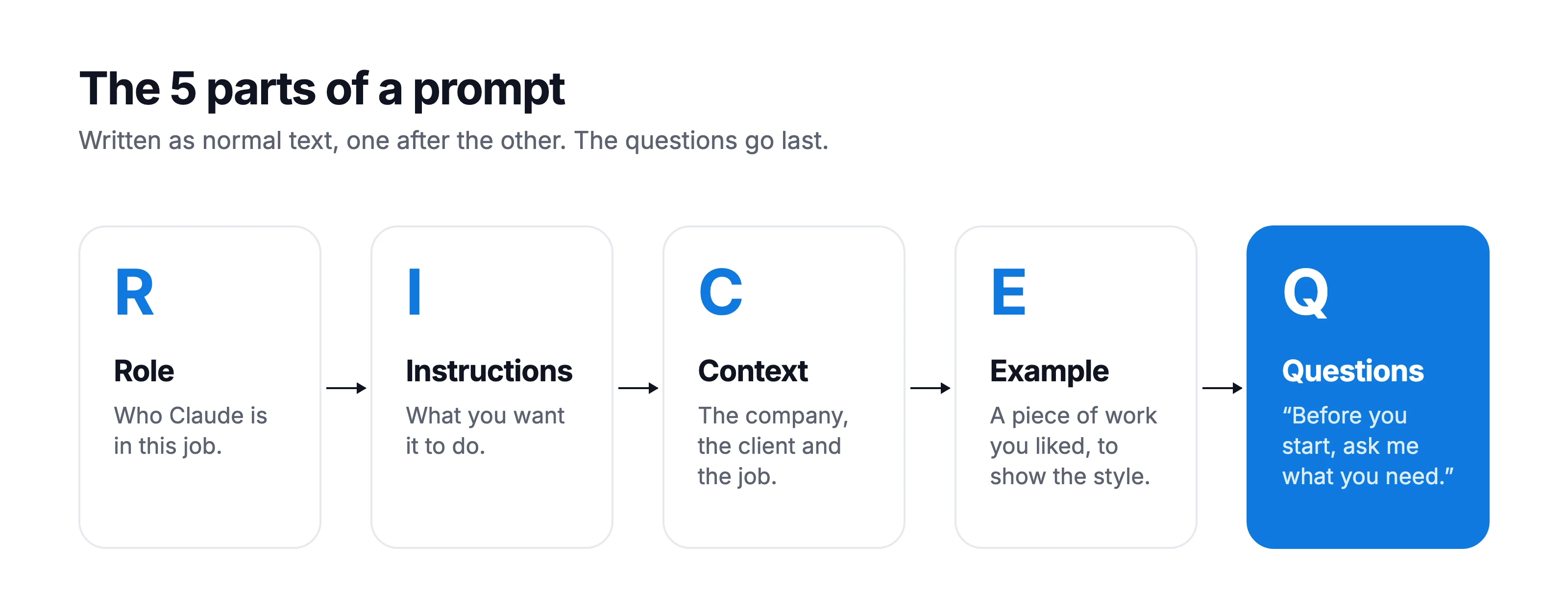
The 5 parts of a prompt, in order. The questions come last.
- Role: who Claude is in this job
- Instructions: what you want it to do
- Context: what Claude needs to know about the company, the client and the job
- Example: a piece of work you liked, so it sees the style
- Questions: “Before you start, ask me whatever you need”
I always put the questions last, so Claude asks me after it has read everything else.
In the prompt you write the 5 parts as normal text, one after the other. Here is a prompt for a proposal that you can copy and adapt to your own company:
You write client proposals for my company.
Write the proposal for the client I had a call with yesterday, using the structure of the template I'm sending you.
I'm sending you the transcript of the call and a file with our services and how we write.
I'm also sending you a proposal I liked, so you can see the style.
Before you start, ask me whatever you can't find in the files or the transcript, with options so I can answer quickly.
Writing prompts this long and careful is called prompt engineering.
Here you'll say: who has time to write a whole page of instructions for every email?
Not me either. That's why I write them once and keep them where Claude finds them by itself.
Where to keep the context so you don't rewrite it
In a Project. A Project has 2 parts: the instructions, which tell Claude who it is and how it works, and the context, with your company's files.
In “WEDOHYPE Sales Pipeline”, the Project where I replied to the client, the instructions tell Claude who it is: my Sales Partner at WEDOHYPE, for everything that happens before a project starts and for the follow-ups after.
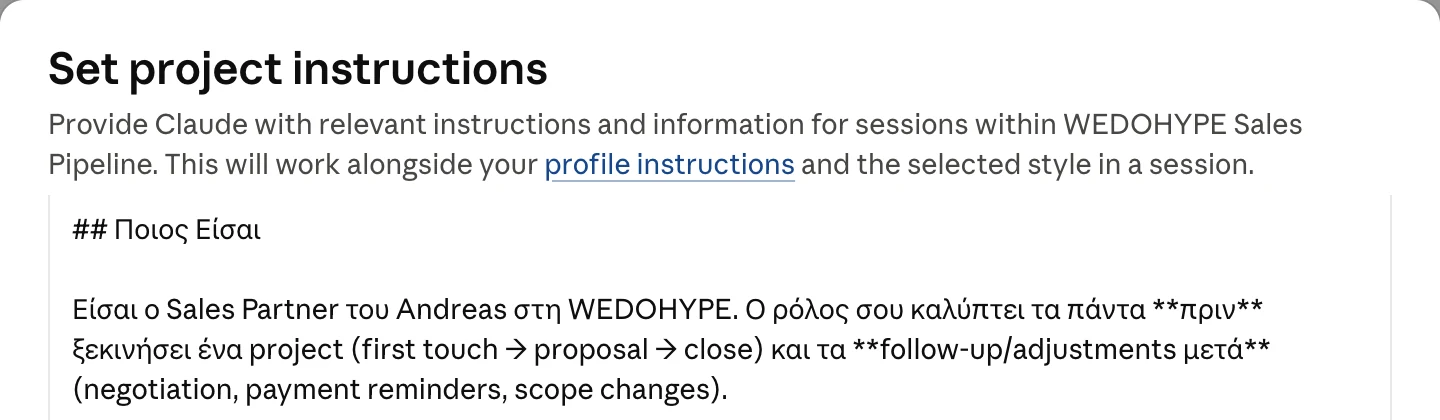
The start of the instructions of the “WEDOHYPE Sales Pipeline” Project.
I also tell it how to talk: short, like a colleague, with no prices inside emails, and a close along the lines of “I'm available for a call whenever you feel like it”.
I tell it which tools it has (Gmail, Drive, Calendar, Fireflies) and what the phases of a sale are.
In the Project's context I have 4 files: the questionnaire for the first call with a client, the guide to our prices, the guide to how a proposal is put together, and the guide to the sitemap, which is the map of a website's pages.
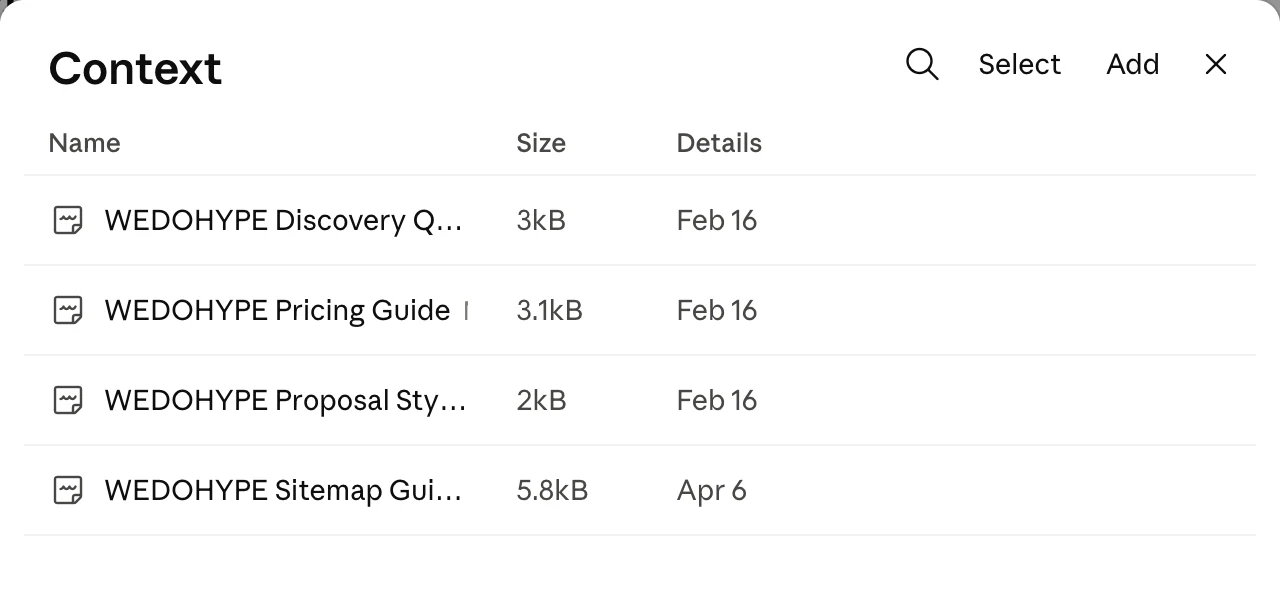
The context of the “WEDOHYPE Sales Pipeline” Project.
All of them cover how WEDOHYPE works and sells, with every client. What concerns a specific client, like a thread or a call, stays in the chat, and Claude pulls it from Gmail and Fireflies whenever it needs it.
✓ Tip: in the instructions of your own Project write “Before you start, ask me whatever you need”. From then on it asks you in every chat without you having to request it.
If you haven't made a Project yet, see how to open a Project in my beginner's guide, or Anthropic's page on Projects.
How I keep my companies' context in Obsidian
For my companies I've taken it a step further. All their context lives in Obsidian, a notes app that saves your notes as plain files on your computer.
I have 2 folders there, 1 for Liberators AI and 1 for WEDOHYPE. Inside are the services, the price list and the packages, the sales process, the questions we ask on first calls, the clients and the strategy.
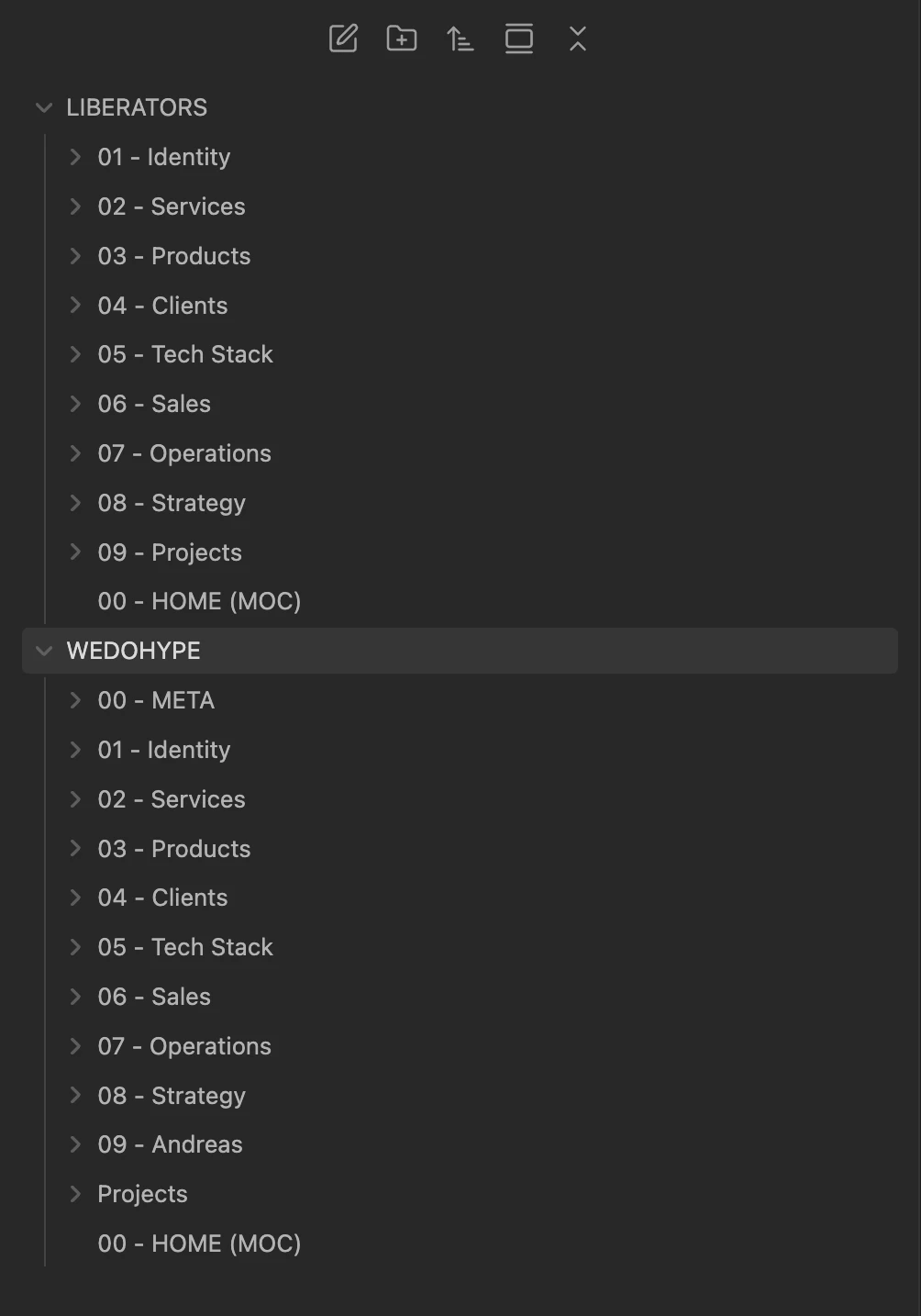
The LIBERATORS and WEDOHYPE folders in Obsidian, with subfolders like Identity, Services, Clients, Sales and Strategy.
Claude Code reads these files whenever it needs them. It's Claude working on the folders of your computer.
When a service or a package changes, I fix it there, and the next time Claude Code finds the new version.
In a separate article I show how I work with Claude Code every day.
For you, the next step after a Project is Claude's Cowork, which reads a whole folder on your computer and gives you back finished files.
To start, a Project is enough.
What to do next
If you haven't worked with Claude yet, start with the beginner's guide. If you already do, make these 3 moves with your next job:
- Pick the job you do most often with Claude (a proposal, an email, a presentation). Open a Project for it and put in the context how you work.
- Connect your email to Claude and write in the instructions “Before you start, ask me whatever you need”. Then do the next job of that kind there.
- The first time you correct something it writes wrong, ask it “Write this correction as a rule for the project's instructions”. Put the rule in the instructions and open a new chat, to see whether it keeps it.
If you'd like to talk through what this could look like in your business, book a call with us.