For most companies, Claude vs ChatGPT comes down to which one your team will use every day. Both are excellent, and a few patterns hold up across the companies we work with:
- ChatGPT is the broader product, with a wide set of built-in extras (image generation, voice, connected apps). OpenAI reported more than 900 million weekly users in February 2026, so your staff have probably used it at home already.
- Claude tends to win on long documents, careful writing, and following detailed instructions. When the task is "read these 40 pages and don't make things up," it's the one we reach for.
★ Remember: you can use both, with a paid seat of each for the people who need them, at $20 to $25 a month per seat.
This guide is for the person deciding whether to put Claude, ChatGPT, or both in front of a 30-person team. We use Claude heavily ourselves, and the section on what we tell our clients explains why.
What Claude and ChatGPT are and who makes them
ChatGPT is made by OpenAI. It launched in late 2022 and runs on OpenAI's GPT family of models. The company keeps adding features around the chat box: file uploads, web browsing, image creation, voice conversations, and plugins.
Claude is made by Anthropic, a company founded by former OpenAI researchers with a stated focus on safety and reliability. Claude is known for handling very long inputs (Anthropic's own model documentation lists a context window of 1 million tokens for every current model), and for producing writing that needs less cleanup.
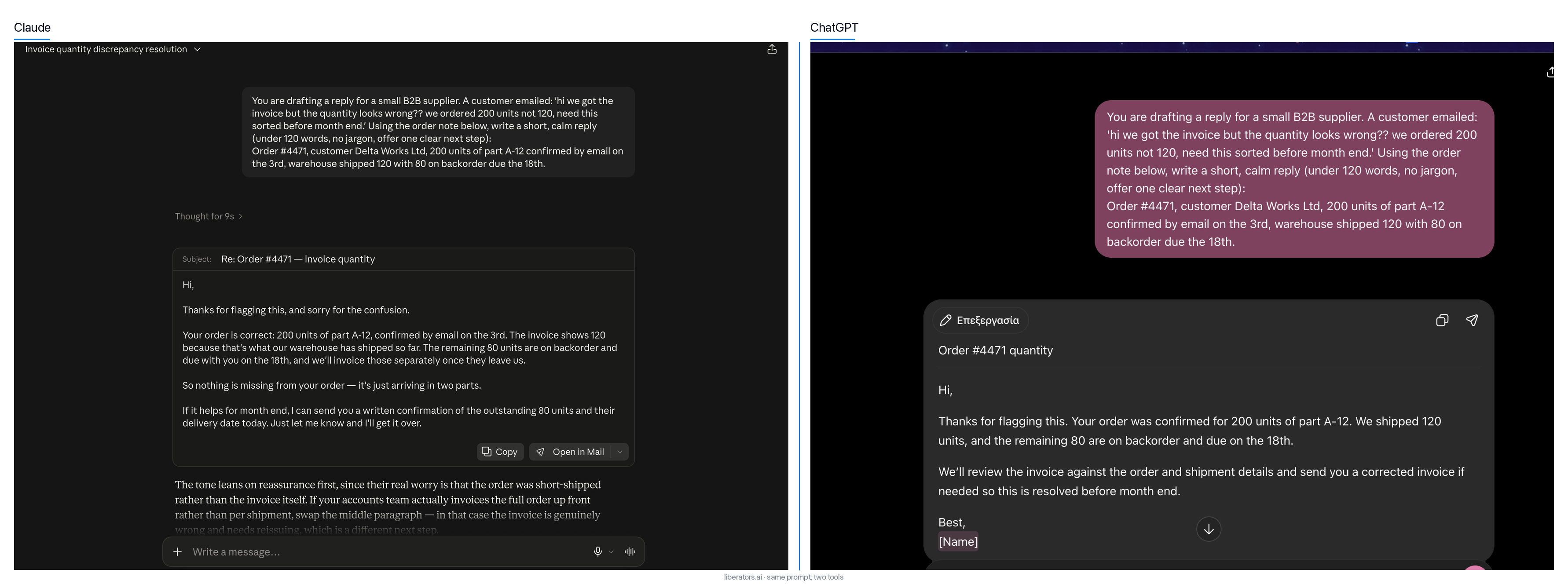 The same real prompt, run in both tools.
ChatGPT vs Claude: where each one is stronger
Compare the 2 on everyday business tasks and clear patterns show up. Here's what we see repeatedly.
Where ChatGPT is stronger:
- Breadth of features. Image generation and a long list of built-in tools live inside 1 subscription. If you want 1 tool that does a bit of everything, this is it.
- Familiarity. Your team likely knows it already. Adoption friction is close to zero, and people use it from day 1.
- Ecosystem. Many third-party tools and tutorials are built around ChatGPT first, because it launched first.
Where Claude is stronger:
- Long documents. Give it a long contract, a full policy manual, or a quarter of meeting notes and it keeps track of the details better across the whole document.
- Writing quality on the first draft. Claude's drafts tend to read more naturally and need fewer edits. For proposals, emails, and anything customer-facing, that saves minutes on every document.
- Following instructions precisely. Give it a detailed brief with rules ("keep it under 150 words, no jargon, mention the warranty") and it sticks to them more reliably.
✓ Tip: you can settle this for your own work with the test in the image above. Take 1 real, messy task from your week, paste the exact same prompt into both, and compare the 2 answers. It takes about 10 minutes.
Both lists are tendencies: ChatGPT writes well and handles long text, and Claude keeps adding features of its own.
Claude AI vs ChatGPT on the things a business cares about
Set the decision against the criteria that come up in a real buying conversation and it gets easier to reason about. Here's the side-by-side.
| What you're weighing | Claude (Anthropic) | ChatGPT (OpenAI) |
|---|---|---|
| Best-known strength | Long documents, careful writing, instruction-following | Broad feature set, large ecosystem |
| Handling long inputs | Very strong; built around large context windows | Strong, improving with each release |
| Built-in extras | Growing (Claude Code and Cowork agent tools, Design, Slides, Docs, connectors, plugins, voice); no native image generation | Wide (image generation, voice, plugins, connected apps, ChatGPT Work and Codex agent tools) |
| Team familiarity | Lower; some ramp-up | Higher; most staff have used it |
| Writing that needs little editing | Usually less cleanup | Good, occasionally more generic |
| Business/Team plans | Yes (Team and Enterprise) | Yes (Business and Enterprise) |
| Data used to train the models by default (business plans) | No, per Anthropic's business terms | No, per OpenAI's business terms |
| Our own default | Primary tool for client work | Used alongside, task by task |
The data row deserves a word, because it's the one owners worry about most.
Data and privacy. On both platforms' business plans (Claude Team and Enterprise, ChatGPT Business and Enterprise), the vendor states it does not train its models on your content by default. Anthropic spells this out for its commercial products in its data and model training policy; OpenAI publishes the equivalent for ChatGPT Business and Enterprise in its enterprise privacy commitments.
The consumer plans work differently: on Claude Free, Pro and Max, and on ChatGPT Free, Go, Plus and Pro, your chats can be used for model training unless you opt out. So keep sensitive work out of personal accounts. Before you standardize on either, ask the vendor 2 plain questions: "Is our data used to train your models?" and "Where is it stored and who can access it?" If the answer takes more than 2 sentences, keep asking.
⚠ Caution: the biggest data risk is staff pasting customer details into a free personal account on their phone. Give them a paid team plan and clear rules on what they can paste, whichever brand you pick.
Claude vs ChatGPT pricing: how the plans stack up
Pricing follows nearly the same shape on both sides, which makes cost a weak tiebreaker once you're on a paid team plan. Here are the sticker prices for each tier.
USD sticker prices as of October 2026, from Anthropic's pricing page, OpenAI's ChatGPT pricing page, OpenAI's Business pricing and the OpenAI Help Center page About ChatGPT Pro tiers. Vendors change these, so re-check the links before you buy.
| Tier | Claude (Anthropic) | ChatGPT (OpenAI) |
|---|---|---|
| Free | $0 | $0 |
| Individual | Pro: $20/mo ($17/mo if billed annually, $200/year) · Max 5×: $100/mo · Max 20×: $200/mo | Go: $8/mo (US) · Plus: $20/mo · Pro: $100, $200 or $500/mo |
| Team / Business (per seat) | Team Standard: $25/seat/mo ($20 if billed annually) · Premium seats: $125/seat/mo ($100 annual). Min. 2 seats. | Business Standard: $25/seat/mo ($20 annual) · Business Premium: $125/seat/mo ($100 annual). Min. 2 seats. |
| Enterprise | $20/seat/mo, billed annually, min. 20 seats, + usage billed at API rates | Custom (sales) |
What that means in practice for a small company:
- Free is for trying it. Keep customer data out of it.
- Individual paid is the everyday seat for 1 professional: Claude Pro and ChatGPT Plus both sit at $20/month. ChatGPT's cheaper Go tier ($8, and it may show ads) is fine for light use; Claude Max ($100 / $200) and ChatGPT Pro ($100 to $500) are for people who keep hitting the usage limits.
- Team / Business is the right company starting point: central billing, shared workspace, and the business data terms above. Both vendors charge $25 per seat per month for the standard seat, or $20 billed annually. Premium seats cost $125, or $100 billed annually.
- Enterprise is where the 2 diverge. Anthropic publishes a seat price: $20 per seat per month, billed annually with a 20-seat minimum, plus usage at API rates, so the bill scales with how hard your team works the models. OpenAI's is sales-led.
✓ Tip: prove the work on 2 or 3 team seats before you buy Enterprise, and track hours saved per seat. A plan that saves 1 person 5 hours a week pays for itself many times over, at either vendor's price.
When to use Claude vs ChatGPT
If you run both, the useful question becomes when to use Claude vs ChatGPT for a given task. Here's a rule of thumb. It won't be right 100% of the time, and that's fine.
| The task in front of you | Reach for |
|---|---|
| Summarize a long contract, report, or manual | Claude |
| Draft a proposal, quote, or client email | Claude |
| Follow a strict brief with lots of rules | Claude |
| Generate an image or an illustration | ChatGPT |
| Brainstorm broadly, explore lots of angles | Either (ChatGPT if you want volume) |
| Use voice to talk through an idea | Either (both have voice mode) |
| Onboard a non-technical staff member to AI | ChatGPT (they likely know it) |
| Analyze a big spreadsheet or dataset dump | Either; test both on your data |
| Anything touching sensitive customer data | Whichever you run on a paid business plan |
The pattern underneath the table: Claude for careful, long, written work; ChatGPT for breadth, media, and reach. Give it 1 week of real use and your team will develop their own instincts.
Claude vs ChatGPT for business: what we tell our clients
When a client asks us to settle this, we start with the work. Then, more often than not, we land on Claude as the primary tool. Here's why, and where that preference stops.
We build a lot of document-heavy systems, such as proposal drafting and search across technical manuals. On that kind of work, Claude's strengths (long inputs, less editing, sticking to instructions) turn directly into hours saved. The task fits the tool, and that's the whole reason. For a business that loses most of its hours to images or social media, we'd recommend ChatGPT.
The tool is maybe 20% of the result. The other 80% is whether it's connected to your own data, whether 1 person owns the rollout, and whether you measure the hours it gives back. The support chats we build answer customer questions from the client's own information, and that grounding (the connection to your data) is what makes their answers right. The grounding and the loop around the model are also what separate a chat window from an AI agent that finishes the task.
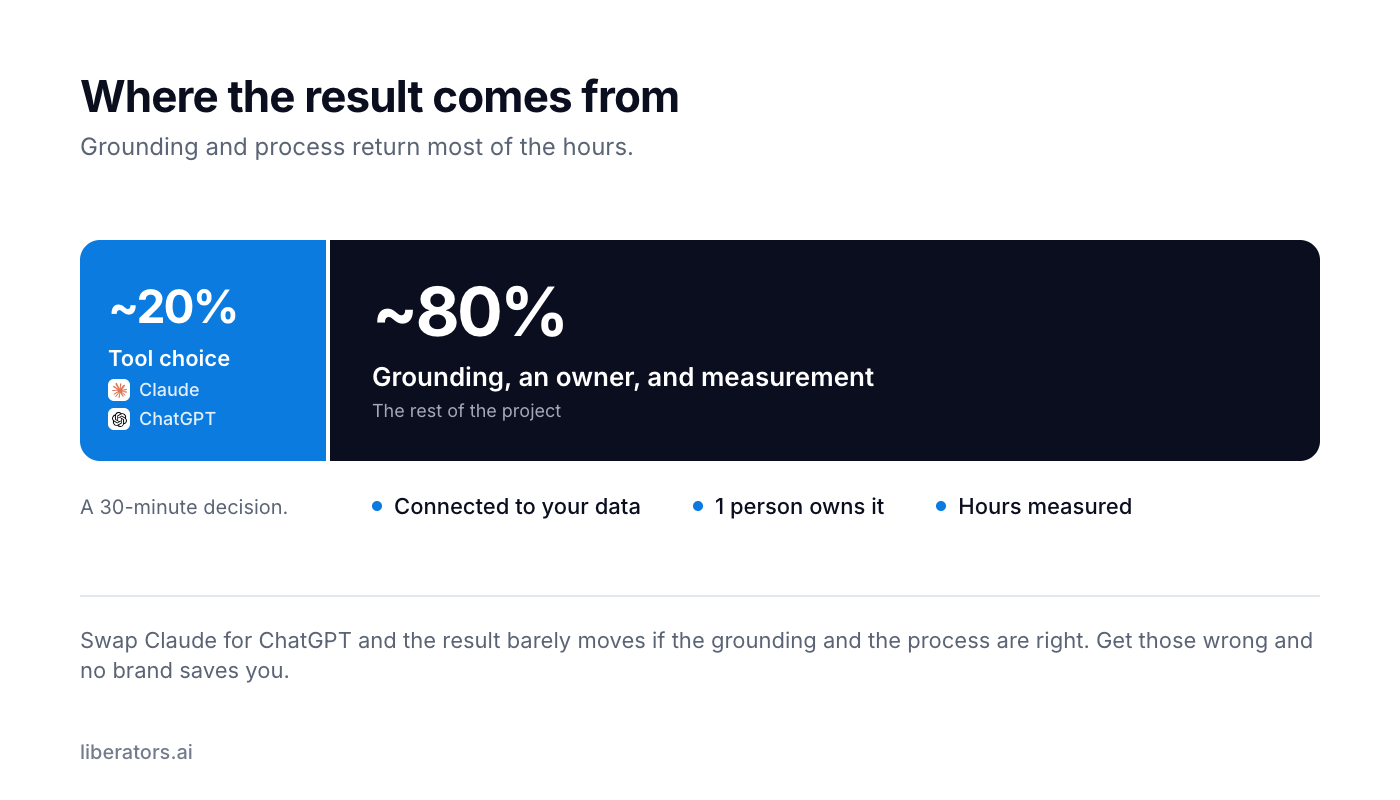 Where the hours in an AI rollout come from.
If Claude is new to you, what Claude does for a business covers the basics in plain words. For smaller teams specifically, AI for small business is the more practical starting point.
Rolling it out to your team
Here's the playbook from the rollouts that stuck:
- Buy team seats. You get the business data terms, central billing, and shared workspaces. It also tells the team the company is serious about it.
- Pick 1 task to standardize first, such as "everyone drafts proposals here." 1 clear task gives people a reason to open it on day 1.
- Name an owner. 1 person who fields questions, shares good prompts, and reports what's working.
- Write 3 ground rules. What can and can't be pasted in, which plan to use, and who to ask. 3 lines on a wiki page are enough.
- Measure hours saved. After 2 weeks, check 2 things: does the proposal now go out in 20 minutes where it used to take 3 hours, and does it go out without anyone fixing it? When both hold, add the next task. When they don't, change the task or the setup.
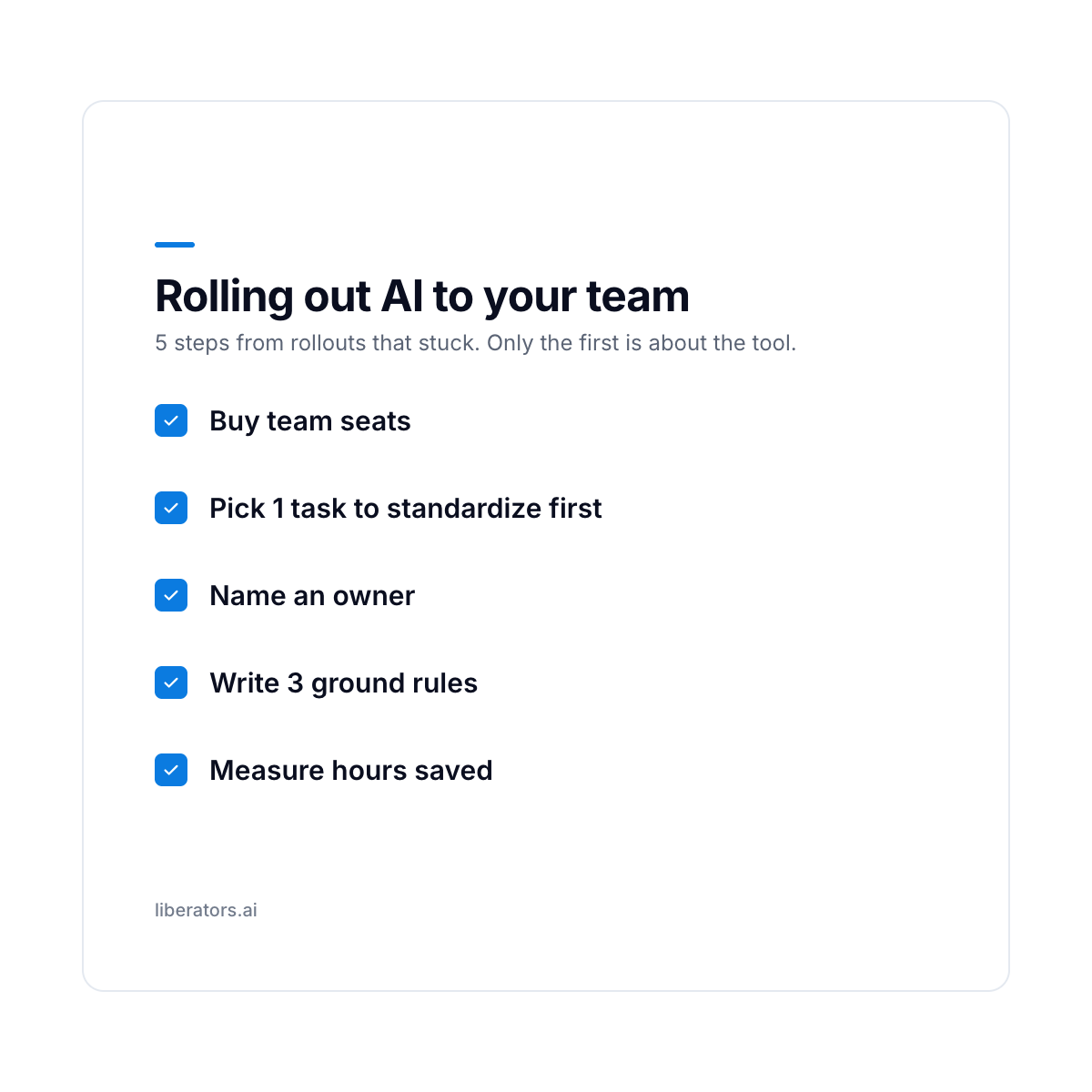 The rollout on 1 card. Step 1 is about the tool; steps 2 to 5 are about people and process.
Claude vs ChatGPT FAQ for business owners
Is Claude better than ChatGPT?
For long documents, careful writing, and following detailed instructions, we find Claude better. For breadth of features, image generation, and sheer familiarity, ChatGPT often wins. The answer depends on the task, so test both on 1 real job from your week and let the results decide.
What can Claude do that ChatGPT can't?
Very little: each vendor usually matches the other's new features within months. Claude tends to stay accurate across a long document and follow a detailed brief closely, and its first drafts usually need less editing. ChatGPT generates images, which Claude doesn't do natively. If writing and long documents are your work, Claude is your answer. If your work is media and breadth, ChatGPT is.
When should I use Claude vs ChatGPT?
Use Claude when the work is long, written, and detail-heavy: contracts, proposals, policy summaries, anything with a strict brief. Use ChatGPT when you want images, a broad brainstorm, or when a non-technical colleague already knows it. If you're only going to pay for 1 and your work is document-heavy, Claude is the safer default. If it's media-heavy, ChatGPT is.
How much do Claude and ChatGPT cost?
Both follow the same 4-tier structure: a free tier, individual paid plans (Claude Pro and Max, ChatGPT Go, Plus and Pro), a per-seat plan for teams (Claude Team, ChatGPT Business), and Enterprise. Claude Enterprise has a published seat price plus usage; ChatGPT Enterprise is priced through sales. Prices shift regularly, so check each vendor's current page before you buy: Anthropic publishes current Claude pricing by tier, and OpenAI lists ChatGPT's tiers on its pricing page. For a company, start on a team plan for the business data terms.
Can I use both Claude and ChatGPT?
Yes. Buy the people who write and analyze all day a Claude seat, and give the people who need images or broad exploration a ChatGPT seat. Running both also shows your team which tool suits which task.
Is my company data safe with Claude or ChatGPT?
On both vendors' business plans (Claude Team and Enterprise, ChatGPT Business and Enterprise), the company states it does not train its models on your content by default. The main risk is staff pasting sensitive data into free personal accounts. Put the team on a paid plan with 3 clear ground rules, whichever brand you pick.
Which one does Liberators use?
We use Claude as our primary tool because most of our client work is document-heavy, where its strengths pay off directly. We reach for ChatGPT when a task calls for it. We match the tool to the work, and we'd recommend you match it to yours.
What to do next
Pick the one your team will open every morning, aim it at 1 repetitive task, and connect it to your data.
If you're not sure which task to point it at, that's the conversation worth having, and it's a short one. Book a free 30-minute AI call. No commitment, and you leave with 2 or 3 things worth building, whether or not you work with us.